Administration and information commands
Use these commands in Discord’s slash-command picker. Administration commands below are server-only. /selfrole, /reactionrole info, /reactionrole add, /welcomer info, /welcomer test, /leaver info and /leaver test declare Manage Server as their default member permission; a server’s Discord command permissions may differ. /iam and /iamnot are separate server-only commands without that declared default.
| Command | Purpose |
|---|---|
/dashboard, /invite, /vote | Return dashboard, invite or voting links. |
/botinfo | Show bot links and process uptime. |
/selfrole | Explain self-role setup. |
/iam / /iamnot | Required role: add or remove the selected, configured self-role. |
/reactionrole info / /reactionrole add | Explain setup or add a custom emoji to a configured reaction-role message. add accepts message-id and emoji; supply both for the operation. |
/welcomer info / /welcomer test | Explain or test welcome settings. The test’s test-dm option defaults to false; set it to true to select the private-message configuration for an interaction follow-up preview. |
/leaver info / /leaver test | Explain or test leave settings. |
Select /botinfo to request the bot’s website, invite and support links and its process uptime.
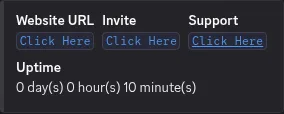
The /botinfo result from the non-production AprilBeta bot in April Testing’s #test channel on 2026-11-02. The deployed revision was unknown.
For example, an administrator can configure and enable a role in Selfrole, then a member selects that role in /iam. April attempts to assign it; /iamnot removes it. If the role is missing, disabled or restricted in the current channel, check the saved configuration. For role failures, check April’s Manage Roles permission and role hierarchy. A saved setting alone does not prove a Discord role change.
For reaction roles, follow the setup guide before /reactionrole add; the message ID and a custom Discord emoji are needed for the add operation. Invalid IDs, invalid custom emoji, duplicates and unknown messages are rejected. For test commands, first save and enable the relevant welcome or leave settings and check the destination and April’s access. A disabled or missing setting or a missing required channel prevents the intended preview. Inspect the returned error and configuration before retrying. The info commands link to setup; they do not configure a feature. A welcome or leave test previews configured output; it does not prove delivery of a real join or leave event.